
D Mhamane
2025-10-30 17:46:57
Fix for unreadable junk characters in Microsoft 365 mail usage reports
Recently, while checking mail usage in Microsoft 365, we noticed that instead of showing proper email addresses, the report displayed unreadable junk characters.
This usually happens because user details are concealed by default for privacy reasons.
To fix it
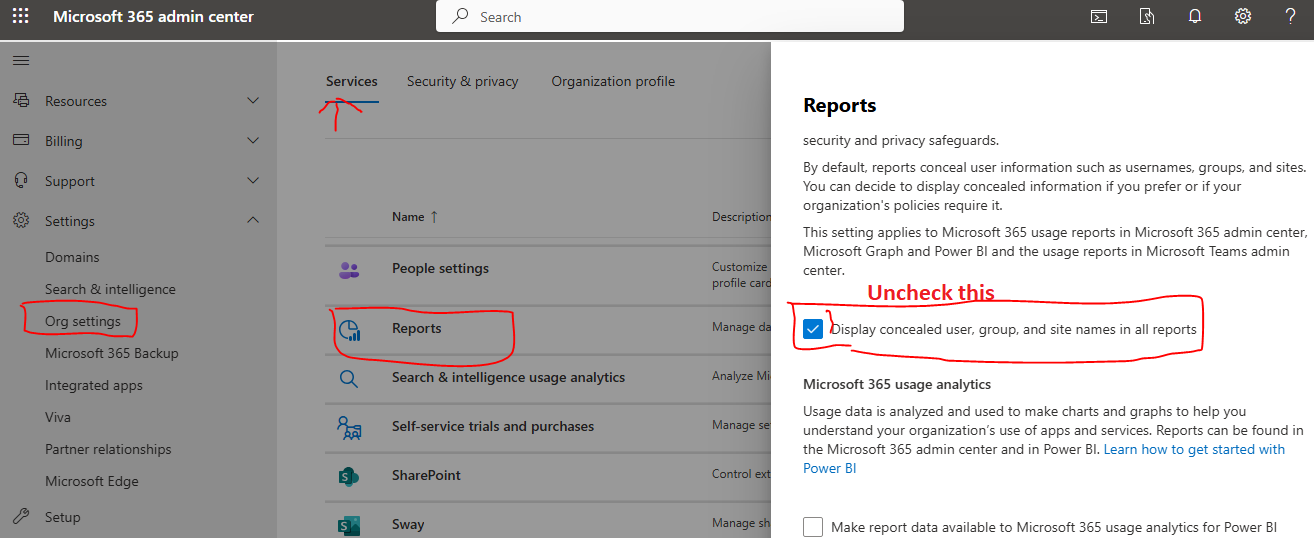
1 Go to Microsoft 365 Admin Center
2 Navigate to Settings then Org Settings
3 Select Services tab and open Reports
4 Uncheck this option Display concealed user group and site names in all reports
Once enabled you will see proper usernames and email addresses in your reports.
Comments
Please login to comment.
No comments yet.